CAD / CAM Training
From a blank sketch to posted, simulated G-code.
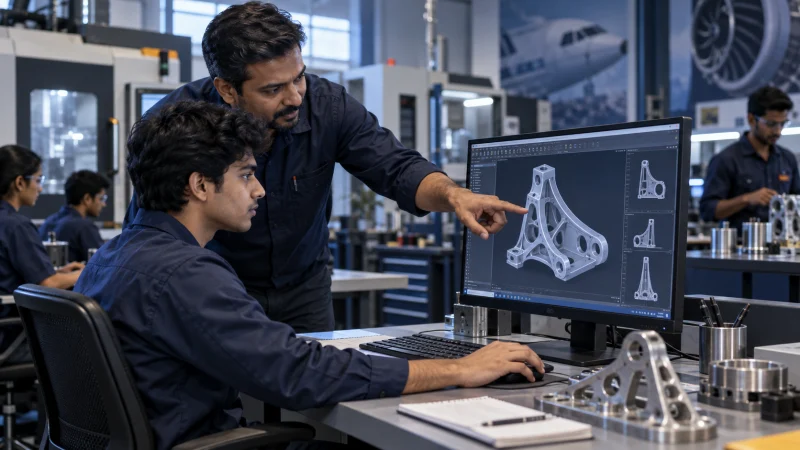
This is the full journey: parametric modelling, drawing interpretation, manufacturing process thinking, toolpath strategy, post processing and simulation. You finish able to take a drawing you have never seen before and produce a programme a shop would actually run.
The course is platform-flexible by design. We run it on whichever mainstream CAD and CAM combination fits the batch, and we confirm the exact software for your batch before you enrol. If you are aiming at a specific employer or sector, tell us in your enquiry and we will steer you towards the platform that sector actually hires for — the modelling discipline, the toolpath thinking and the process reasoning transfer across all of them anyway.
Roughly seventy percent of contact time is spent at a workstation building something, and every learner programmes a complete part from drawing to verified G-code as the assessed project. That project becomes portfolio material — an interviewer can look at your setup sheet and your simulation report rather than taking your certificate on trust.
What we deliberately do not do is teach the menus. You will be asked why you picked that datum, why the roughing strategy suits that material, and what the operator is going to say when they see your tool list. That is harder, and it is the entire difference between someone who has done a course and someone who can be given a job.
Course at a glance
| Duration | 6–10 weeks |
|---|---|
| Mode | Classroom · Live online · On-site |
| Who it is for | Diploma / engineering graduates, design engineers, operators moving into programming |
| Prerequisites | Ability to read an engineering drawing. Mechanical or production background strongly recommended. |
| Certificate | Issued on completion |
| Fees | Quoted per enquiry — varies by mode and batch |
Module by module
Sequenced so each module depends on the one before it. We adjust depth to the batch, but not the order.
| # | Module | What it covers |
|---|---|---|
| 01 | Engineering drawing & GD&T | Projection, sectioning, tolerances, datums, feature control frames and surface finish — reading a print the way a machinist reads it. |
| 02 | Parametric modelling | Sketching discipline, constraints, feature trees, design intent, assemblies and drawing generation. |
| 03 | Surface & advanced modelling | Complex surfaces, blends, hybrid modelling and repairing broken imported geometry. |
| 04 | Manufacturing process fundamentals | Machine types, tooling, workholding, cutting theory, feeds and speeds, and how material choice changes everything. |
| 05 | CAM: 2.5D and 3-axis | Stock setup, work coordinate systems, roughing and finishing strategies, drilling and hole-making cycles. |
| 06 | CAM: multi-axis | 3+2 positional work, an introduction to 5-axis simultaneous, tool axis control and collision avoidance. |
| 07 | Post processing & G-code | How a post works, reading the code your CAM produces, safe G-code editing, and matching your shop's conventions. |
| 08 | Simulation & verification | Machine simulation, collision checking, gouge detection and reading a verification result properly. |
| 09 | Documentation | Tool lists, setup sheets, work offsets and operator notes — the package that makes a programme usable. |
| 10 | Capstone project | One complete part: model it, plan it, fixture it, programme it, post it, simulate it, document it. |
What you will be able to do
Stated as capabilities, not topics covered. If you finish and cannot do these, the course has not worked.
- Read and interpret an engineering drawing including GD&T, and identify what will be difficult to hold before you start.
- Build clean, fully-constrained parametric models and assemblies with genuine design intent.
- Choose a manufacturing process route and defend the sequence and datum scheme you picked.
- Generate efficient 2.5D, 3-axis and 3+2 toolpaths with cutting parameters suited to the material.
- Post to a real controller, read the resulting G-code, and edit it to shop standards.
- Verify a programme in simulation and correct what the simulation finds.
- Produce the complete handover package a shop floor needs to run your programme.
Certification & placement support
A completion certificate recording your modules and your assessed project — plus the part of it that actually matters: interview preparation, CV guidance aimed at manufacturing employers, a portfolio of work you can open and explain, and referrals into our industry network when we think you are ready.
We do not guarantee placement, and this is a Teklogic certificate rather than a software vendor's certification. What we can do is make sure you walk in able to demonstrate something real.
Register for this courseBefore you enrol
We confirm the exact CAD and CAM platforms for your batch before you enrol, and we choose them to match where you are trying to get hired — tell us the employer or the sector in your enquiry. Teklogic is an independent training provider and is not an authorised reseller or certified training partner of any software vendor; what we teach is manufacturing engineering, using industry-standard tools. The modelling discipline and the toolpath reasoning transfer across platforms, which is the point.
For classroom batches, workstations are provided. For live online you will need a machine capable of running CAD, and we will guide you to legitimate student or trial licences. We do not distribute software, and we will not point you towards pirated copies — apart from the legal problem, a cracked seat with a broken post processor actively teaches you wrong habits.
Yes, on completion, and it records the modules you covered and the capstone part you programmed. Be realistic about what any training certificate is worth on its own, though: what gets you hired is being able to open your capstone project in an interview and explain your decisions. That is what the course is built to give you.
Send us a drawing. We’ll send back a plan.
Share a 2D print, a STEP file or a scope note. You get a written response with feasibility, approach and an indicative timeline — no obligation, and your data stays yours.